
TensorFlow 2.21 CPU on IBM Power9 (ppc64le)
Context
TensorFlow (TF) is the most globally adopted machine learning framework. However, since 2021, Google ended official support for pre-compiled binaries for the ppc64le architecture, and the tensorflow/community repository was archived in 2025.
Environment Used
- Hardware: ppc64le architecture;
- RAM: ~64GB;
- Execution: Virtual Machine (VM);
- Operating System: Alma Linux 8.10 (ppc64le), binary compatible with Red Hat Enterprise Linux (RHEL) 8.9/8.10.
Initial Setup (Installing TF 2.14)
As a starting point, we validated the installation of TensorFlow 2.14.1 (via RocketCE) on an IBM Power9 VM (ppc64le architecture) with AlmaLinux, using Miniforge (conda). Here are the commands for installation:
conda create -n tf214 python=3.11 -y
conda activate tf214
conda install -c rocketce tensorflow-cpu=2.14.1 -y

# expected output: 2.14.1
python -c "import tensorflow as tf; print(tf.__version__)"
As a result, functional TensorFlow 2.14.1 is expected. This same version is also available on the Open-CE channels of Oregon State University and MIT. With TF 2.14 working, we have access to: Keras, TensorBoard, TensorFlow Hub, tensorflow-text, Hugging Face Transformers, Jupyter, and the entire classic ML stack.
TF 2.14 vs TF 2.21 (The Latest)
Version 2.14 is functional but is several versions behind the latest, 2.21. The most significant differences focus on incompatibility with two very important tools:
- Keras 3: a complete rewrite that transforms Keras into a multi-backend framework, allowing the same model and code to run on TensorFlow, PyTorch, or JAX without any changes. TF 2.14 only supports Keras 2.
- NumPy 2: In addition to correcting dozens of historical API inconsistencies, NumPy 2.0 brings significant efficiency gains. TF 2.14 does not support NumPy 2.
Compiling TensorFlow 2.21 Natively on Power9 (CPU-Only)
Initially, we successfully compiled TensorFlow 2.21 (CPU-Only) directly from source code. This compilation was performed on an IBM Power9 VM and generated a native .whl package for linux_ppc64le. Subsequently, TF 2.21 had its functionality validated through a complete suite of tests. This is a fundamental milestone upon which GPU support will be built in the next stage.
Challenges: Hermeticity and x86 Dependency
The modern architecture of TensorFlow (and its build system, Bazel 7) embraced the “Hermetic” model: forcing the use of pre-compiled binaries and logic tied to x86_64, aarch64 architectures, and NVIDIA accelerators. For ppc64le, this means that a naive compilation simply fails when trying to download tools for incompatible architectures.
We identified four categories of blockage:
- Bazel 7: Google does not distribute Bazel 7 for PowerPC. It would be necessary to compile it from scratch.
- Hermetic Toolchains: TF 2.21 tries to download pre-compiled LLVM/Clang for x86 or aarch64, which doesn’t run on Power9.
- CUDA/GPU Dependencies: Even in CPU-only mode, the build system tries to download and link giant NVIDIA libraries. Our strategy was to completely isolate GPU support with empty stubs, ensuring a stable CPU-only foundation before adding any accelerators.
- Latent C++ Bugs: XLA and MLIR code contain constructs that work in Google’s Clang but break in the system’s default GCC 8.5, from AVX-512 flags to template ambiguities in
absl::NoDestructor.
Compilation Process
Step 1: Compiling Bazel 7.1.0 from Scratch
Since Google does not distribute Bazel 7 for ppc64le, the first step to enable its use on ppc64le architecture was to compile Bazel itself from its source code, using the -dist.zip file, which already includes the necessary bootstrap artifacts for Bazel to self-build without depending on a previous version of itself. The process requires Java 21 and takes between 1 and 2 hours depending on the cores available in the VM. The critical point here is passing the correct variables to the compile.sh script. Without this step, none of the following steps are possible. The bazel build command simply doesn’t exist for ppc64le otherwise. We created a tutorial with the Bazel 7.1 installation process which can be accessed in the repository.
Step 2: Bypass Strategy — Stub Repositories
With Bazel 7 functional on ppc64le architecture, we attacked the problem of hermetic dependencies. Our solution was to create “stub” repositories, empty local directories that satisfy Bazel’s dependency declarations without downloading anything:
- LLVM stubs: Empty filegroups that satisfy toolchain rules without trying to install LLVM.
- CUDA/ROCm/TensorRT stubs: Empty C++ libraries and Starlark rules that allow the build to proceed without missing dependency errors.
- PyPI stubs: Stub Python modules that simulate the dependencies of Google’s hermetic pip, forcing the use of libraries from the conda environment.
- Python stub: Redirects to the Python in our conda environment, bypassing the download of the hermetic Python that doesn’t exist for ppc64le.
All stubs are injected via --override_repository in the bazel build call, without altering the TensorFlow source code.
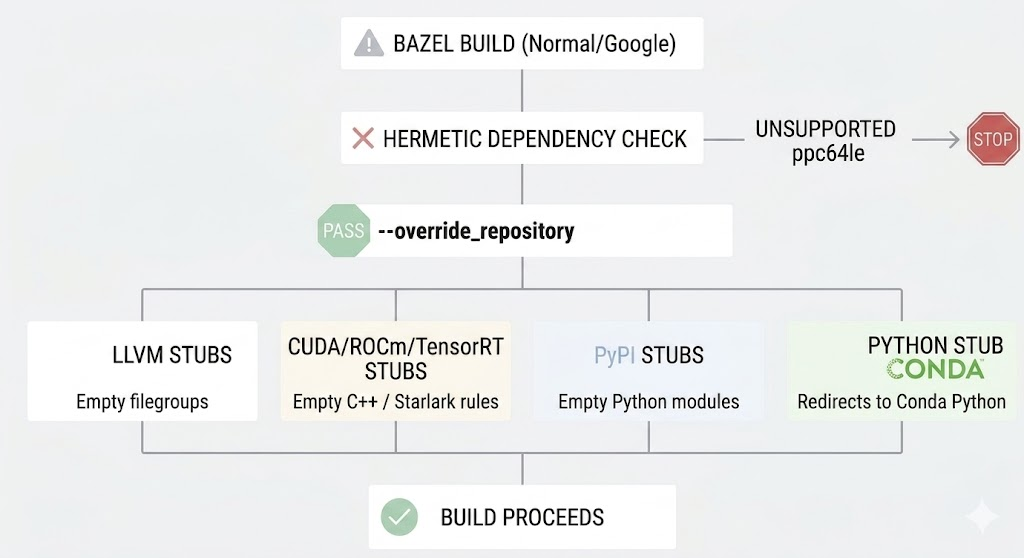
Bypass Strategy — Stub Repositories
Step 3: Surgical Patches in the Source Code
With the build infrastructure resolved, we found 21 incompatibilities in TensorFlow’s C++ and Python code that manifest exclusively in the GCC 13 + ppc64le combination. The problems focused on three categories:
- Clang-exclusive compilation flags that GCC rejects.
- C++ template ambiguities in XLA and MLIR components that Google’s compiler masks but GCC 13 exposes.
- References to CUDA and TensorRT headers that cease to exist when replaced by stubs.
Each incompatibility was resolved with a precise Python patch, without altering TensorFlow’s functional logic. The complete table with all 21 patches is available in the repository.
Step 4: The Compilation
With all patches applied, the final compilation is triggered with a single bazel build command. In addition to standard optimization flags, the command injects all stub repositories via --override_repository, totaling about 80 flags. Bazel’s incremental cache is fundamental here: each time a patch is needed and compilation is resumed, only the affected targets are recompiled. This transformed the “patch → compile → error → patch” cycle from unfeasible to manageable (about 4 hours).
The Definitive Solution: Conda Package and Binaries (Ready for Use)
So that the community doesn’t need to redo all this complex build engineering, we packaged the result of this engineering into a “plug and play” solution.
We made an official Release available in the repository containing the source code already with all patches applied and the generated native .whl binary. More importantly: we created and published a complete Conda recipe that automatically resolves classic C++ library compatibility issues (GLIBCXX and GCC mismatch) common on Power9.
Now, native TensorFlow 2.21 can be installed directly through our Conda channel, providing the same installation experience as official corporate distributions.
How to Install (Quick Tutorial)
To use TensorFlow 2.21 in your Power9 environment immediately, simply run:
conda create -n tf221 python=3.11 -y
conda activate tf221
conda install -c ufcg-ibm -c conda-forge tensorflow-cpu=2.21.0 -y
A detailed installation tutorial via Conda is also available in our repository.
Functional Result on IBM Power9 server
We installed the final package and executed a complete suite of 35 tests, covering eight functional categories: from basic tensor operations to model save/load and stress tests. All 35 tests passed. The stress test (5000×5000 matrix multiplication) successfully executed on the IBM Power9 CPU, and training an MLP for 20 epochs confirmed loss convergence, indicating that automatic differentiation, optimizers, and numerical operations are all working correctly from end to end.
IBM Tools using TensorFlow
IBM AI tools like AIF360, AIX360, and ART were already compatible with TensorFlow 2.14, as they are Python libraries that use the environment’s TF without binary coupling. The real value of native TensorFlow 2.21 compiled for Power9 lies in continuity: these libraries were already starting to declare dependencies on TF versions higher than 2.14, which meant that without this build, the Power9 environment would remain stuck on old and unsupported versions. Additionally, the improvements accumulated in TF between versions 2.14 and 2.21 bring incremental performance gains to fairness, explainability, and adversarial robustness analysis pipelines.
Reproducibility and Materials
The entire process and generated artifacts are documented and available in our repository:
- Official Release: Altered source code and ready-to-use
.whlbinary. - Conda Installation Tutorial: Practical guide to install version 2.21 directly through our Conda channel.
- Bazel 7.1.0 Compilation Tutorial: Step-by-step guide to compile Bazel 7.1.0 from source.
- TensorFlow 2.21 Compilation Tutorial: Full guide to compile TensorFlow 2.21 with all necessary patches.
Impact
This compilation represents the latest version of TensorFlow natively available for ppc64le and with it:
- Keras 3 becomes available for ppc64le for the first time.
- NumPy 2.0 ceases to be a bottleneck for the Python scientific ecosystem on IBM Power9.
- Hugging Face Transformers stack with more models compatible with Power9.
Next Steps
The TF 2.21 we compiled runs exclusively on CPU. The next challenge is to repeat the process with CUDA enabled on IBM Power9 servers equipped with NVIDIA GPUs. The stubs we created to isolate the GPU in this compilation were designed precisely to facilitate this transition: by replacing them with real CUDA libraries, we will have a solid starting point for GPU compilation. If successful, Power9 would have the latest deep learning framework with hardware acceleration, something non-existent today in any distribution for ppc64le.