
LLM Inference with vLLM Using GPU on Power9
Background
This post aims to present the steps necessary to install vLLM in an IBM POWER9 environment (ppc64le architecture). The main required resources, modifications, dependencies, versions used, and installation steps necessary to run inference with a given model will be detailed.
vLLM is a tool focused on serving and efficient inference of large language models (LLMs), allowing models to be exposed through an API and execute inference in an optimized way, especially in GPU environments.
The need to install vLLM arose during the data generation process with the InstructLab tool. In that workflow, it is necessary to use a teacher model to generate synthetic data that will later be used for training or fine-tuning other models. For this, it is possible to use tools such as llama-cpp, already compatible with the IBM POWER9 environment, or vLLM, which was not yet available due to installation difficulties on this architecture. Unlike llama-cpp, which is more geared towards local execution and smaller-scale scenarios, vLLM stands out for better GPU utilization and the ability to handle multiple requests simultaneously in an efficient manner, being more suitable for large-scale inference scenarios and production environments.
Thus, we will present the technical steps required to make the vLLM installation feasible in the IBM POWER9 environment (ppc64le), describing the adaptations made so that the tool works correctly in this context.
TL;DR
- Compilation and installation of LLVM, required as build infrastructure for subsequent dependencies.
- Compilation and adaptation of Triton, including adjustments for compatibility with the Power9 architecture.
- Installation and configuration of vLLM, considering its dependencies and specific runtime requirements.
- Development of containers containing the entire configured environment for executing the tool.
- Practical demonstration of using the images, including server startup and running inference using GPU.
Execution Environment
The environment used for the vLLM installation includes:
- Architecture: IBM Power9 Server (ppc64le architecture).
- Operating System (OS): AlmaLinux 8.10 binary compatible with Red Hat Enterprise Linux (RHEL) 8.9/8.10.
- RAM: 512GB.
- GPUs: 4x NVIDIA Tesla V100 SXM2 16GB (NVLink2).
Dependencies and Installation
During the vLLM build process, three main dependencies stand out: LLVM, Triton, and PyTorch. These dependencies are problematic for the correct functioning of the tool.
LLVM constitutes the foundation of the compilation infrastructure used throughout the process, being responsible for generating, optimizing, and transforming intermediate representation into executable low-level code. In the context of vLLM, its role is essential to enable efficient execution of GPU kernels, especially those defined by Triton, which rely directly on its compilation backends (components responsible for generating optimized code for different hardware architectures). Triton, in turn, acts as the component responsible for defining and executing GPU-optimized kernels, playing a central role in the inference efficiency of language models. Its integration with LLVM allows generating highly optimized code for different architectures. PyTorch provides the foundation for tensor manipulation and model execution, offering the fundamental operations for GPU inference, in addition to serving as an interface to acceleration mechanisms and low-level libraries.
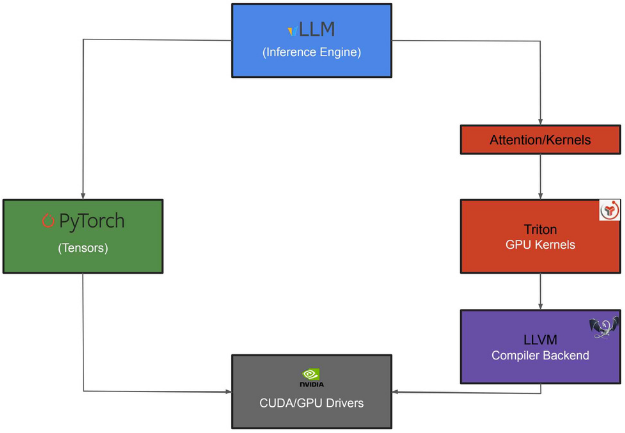
Dependency flow for compiling vLLM on Power9.
Due to the lack of native support for these packages on the ppc64le architecture, their use on IBM POWER9 required several adaptations based on the official repositories of these tools. These modifications ranged from fixing incompatibilities in specific methods to adjusting sub-dependencies that did not support the ppc64le architecture, as well as using Conda to help manage environments and dependencies. In some cases, manual compilation of additional components was also necessary. After overcoming these challenges, it became possible to install and run vLLM on the IBM POWER9 environment.
Due to the large number of steps involved, the step-by-step detailed procedures are presented in this link: vllm installation guide. It is worth noting that each of the steps described is essential to guarantee the correct compilation and execution of vLLM in the proposed environment.
Containerization
During the installation process, it was observed that the large number of involved steps could make environment reproduction difficult and lead to inconsistent scenarios. Because of this, we chose containerization of the solution as a way to make the experiment reproducible, portable, and simpler to use for other users.
For this, we provide (in this repository) scripts responsible for both building the images and automating execution, organizing all necessary steps. These scripts perform tasks such as identifying available resources, copying required CUDA binaries, and starting vLLM properly.
Execution was simplified so that the user only needs to provide the local path of the model to be used. Parameters such as port, number of GPUs, and image to be executed are optional and have predefined default values.
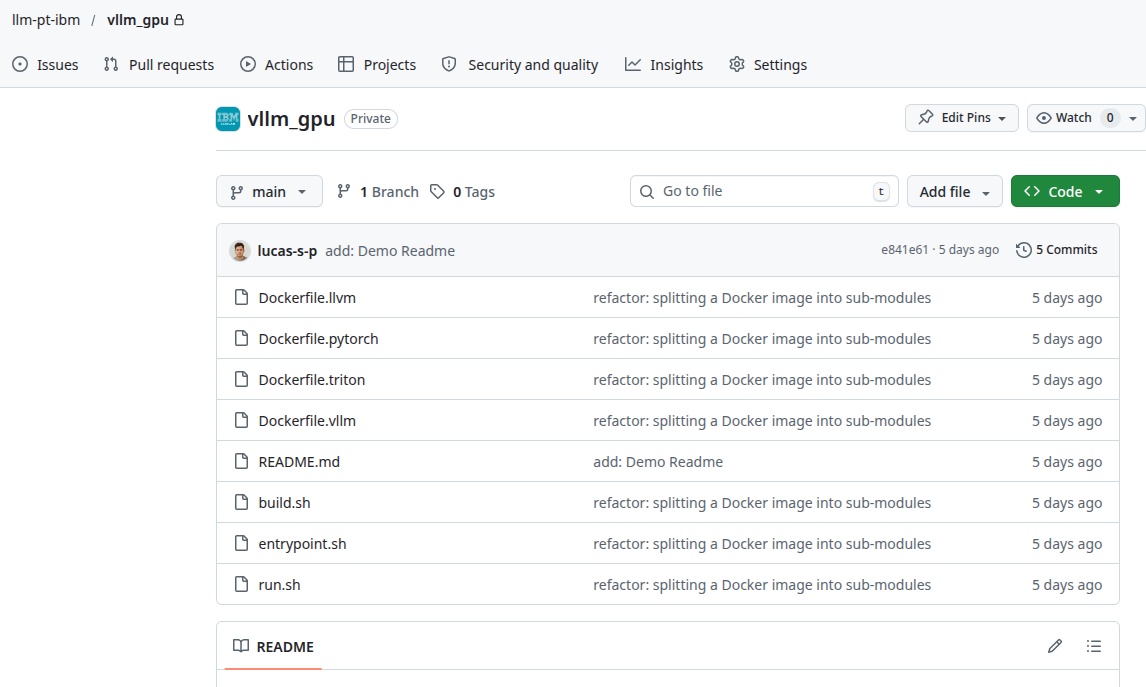
Repository developed for running vLLM via containers.
Additionally, we provide a video (vLLM Power9 demonstration) that demonstrates the use of vLLM from the provided repository.
Final Considerations
With the resources provided in this repository, it became possible to automate the process of installing and using vLLM on ppc64le architectures with V100 GPUs.
In the context of the IBM-MultiArq project, this solution proves especially relevant for using InstructLab, enabling local execution of teacher models via vLLM, expanding experimentation and development possibilities within the proposed environment.
Next Steps
As a continuation of this work, we propose conducting a comparative performance study between llama-cpp and vLLM. Additionally, the repository was structured to provide continuous support for vLLM, including its adaptation to future versions, the identification of remaining limitations, and the evolution of solutions as new challenges arise.